Configuration
Alice is designed to be easy to set up while offering powerful customization options to fit your workflow.
Basic Setup
To get started with Alice, you need to create an instance and attach its navigator key to your application. This is required so Alice can render its inspector UI over your app.
1. Create the Instance
First, create a global instance of Alice that you will use throughout your app:
Alice alice = Alice();
2. Attach the Navigator Key
Pass Alice's navigator key to your root MaterialApp or CupertinoApp:
MaterialApp(
  navigatorKey: alice.getNavigatorKey(),
  home: MyHomePage(),
);
Using an Existing Navigator Key
If your application already manages its own custom navigator key, you can provide it directly to Alice via the configuration object:
Alice alice = Alice(
  configuration: AliceConfiguration(navigatorKey: yourNavigatorKeyHere)
);
Alternatively, if you need to pass it lazily after initialization:
alice.setNavigatorKey(yourNavigatorKeyHere);
Advanced Configuration
You can customize Alice's behavior by passing an AliceConfiguration object to the constructor. Below are all the available settings you can tweak.
Notifications
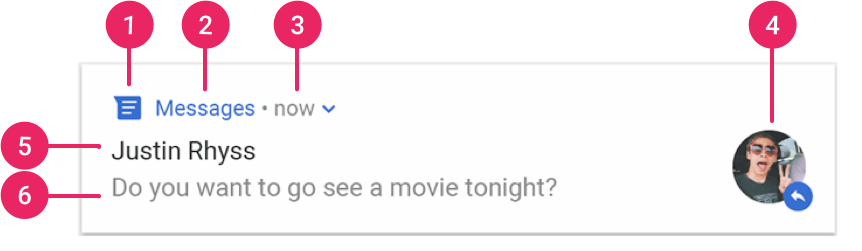
You can configure Alice to show a system notification whenever HTTP requests are made. Clicking this notification quickly opens the inspector.
For notification taps to work correctly on iOS, you must configure your ios/Runner/AppDelegate.swift file.
First, add the flutter_local_notifications import at the top. Then, inside didFinishLaunchingWithOptions, register the plugin callback and set the UNUserNotificationCenter delegate.
Your AppDelegate.swift should look similar to this:
import UIKit
import Flutter
import flutter_local_notifications // Add this import

@UIApplicationMain
@objc class AppDelegate: FlutterAppDelegate {
  override func application(
    _ application: UIApplication,
    didFinishLaunchingWithOptions launchOptions: [UIApplication.LaunchOptionsKey: Any]?
  ) -> Bool {

    // Add these lines for Alice/Local Notifications:
    FlutterLocalNotificationsPlugin.setPluginRegistrantCallback { (registry) in
        GeneratedPluginRegistrant.register(with: registry)
    }

    if #available(iOS 10.0, *) {
      UNUserNotificationCenter.current().delegate = self as? UNUserNotificationCenterDelegate
    }
    // End of Alice configuration

    GeneratedPluginRegistrant.register(with: self)
    return super.application(application, didFinishLaunchingWithOptions: launchOptions)
  }
}
If you want to pass custom notification icons, you can use the notificationIcon parameter for the small icon (typically a monochrome silhouette) or notificationLargeIcon for the large icon.
Alice alice = Alice(
  configuration: AliceConfiguration(
    showNotification: true,
    // Optional: Provide a custom Android small icon resource name (defaults to @mipmap/ic_launcher)
    notificationIcon: "myNotificationSmallIconResourceName",
    // Optional: Provide a custom Android large icon resource name
    notificationLargeIcon: "myNotificationLargeIconResourceName",
  )
);
Shake to Open
You can enable a physical "shake" gesture to quickly open the Alice inspector. This is disabled by default, but is very handy for physical device testing.
Alice alice = Alice(
  configuration: AliceConfiguration(showInspectorOnShake: true)
);
UI Directionality
If you need to force a specific text direction (e.g., RTL or LTR) for the Alice UI, you can override the app's default directionality. If left empty, Alice inherits the directionality of your app.
Alice alice = Alice(
  configuration: AliceConfiguration(directionality: TextDirection.ltr)
);
Share Button
The inspector includes a share button by default, allowing you to easily export and share HTTP logs. If you want to hide this button, set showShareButton to false.
Alice alice = Alice(
  configuration: AliceConfiguration(showShareButton: false)
);
Duplicate Request Detection
Alice can automatically detect and highlight N+1 duplicate requests (identical HTTP requests made within a short time window). This helps identify inefficient network patterns like missing caching or duplicated API calls in UI rebuilds.
Alice alice = Alice(
  configuration: AliceConfiguration(
    detectDuplicates: true, // Enabled by default
    duplicateDetectionWindow: Duration(seconds: 1), // Default time window
  )
);
Duplicate Request Detection
Alice can automatically detect and highlight N+1 duplicate requests (identical HTTP requests made within a short time window). This helps identify inefficient network patterns like missing caching or duplicated API calls in UI rebuilds.
Alice alice = Alice(
  configuration: AliceConfiguration(
    detectDuplicates: true, // Enabled by default
    duplicateDetectionWindow: Duration(seconds: 1), // Default time window
  )
);